BuddySlidesBeta

Turn your Articulate Rise course into a PowerPoint.

Your course never leaves your computer. BuddySlides converts it right here in your browser — no uploads, no account.

Drop your Rise course export here

or click to choose it from your computer

  • Never uploaded
  • No account
  • Runs in your browser
How do I get this file?
  1. In Rise, open the course you want to turn into slides.
  2. Click Publish, then choose Web. (The LMS version, the one made for a learning platform, works too.)
  3. Rise gives you a file to download — drop that file here.
Does it work with translated courses?

Yes. If you translated your course in Rise, its export holds every language. BuddySlides finds them and lets you choose one, or make a deck for each language in one go.

Edited the pictures? Swap or crop the pictures on one deck, and BuddySlides can copy those changes into every other language, so you only do them once. The course’s main language is free; the others come with Pro.

Is it really private?

Yes. When you open this page, your browser downloads BuddySlides itself. From then on, everything happens on your computer: your course file is read there, and the PowerPoint is built there. Neither one is sent anywhere — not to us, not to anyone.

You can check it yourself. Open your browser's developer tools, go to the Network tab, and convert a course. You'll see the page load its own files, and nothing carrying your course.

Ready to convert

course.zip

Reading your course…

This usually takes a moment. Hang tight.

Your PowerPoint is ready

Download PowerPoint

Changed the pictures on this deck?

Something look wrong? Report a problem — it helps during the beta.

for your report — no course content, and you'll see it first.

We couldn't use that file

Think this is a mistake? Report a problem

for your report — you'll see it first.

Apply your edits to other languages

Changed the pictures on one language’s deck? Drop in the original course (.zip) and your edited deck (.pptx). We’ll rebuild every other language with the same picture changes, and each keeps its own translated text.

What carries over: pictures you moved, resized, cropped, swapped, deleted or added. Text is laid out fresh in each language, so moving a text box doesn’t carry over.

Drop both files here

your course .zip and your edited .pptx — or click to choose

From Rise lesson to finished slide

BuddySlides reads your course and designs each part as a slide.
Drag it: the same lesson in Rise on the left, and as a PowerPoint slide on the right.

Your course, in the look you want

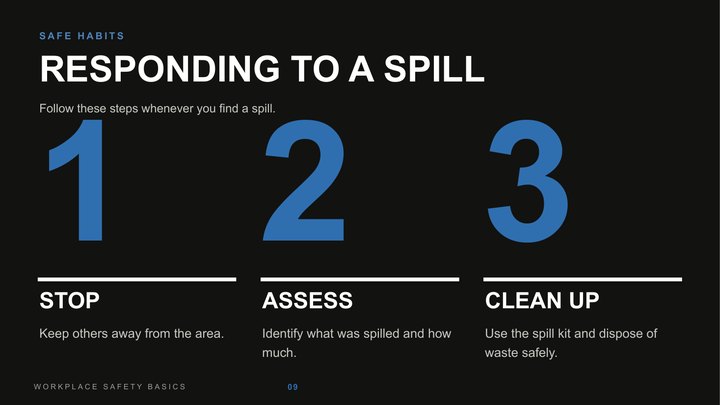
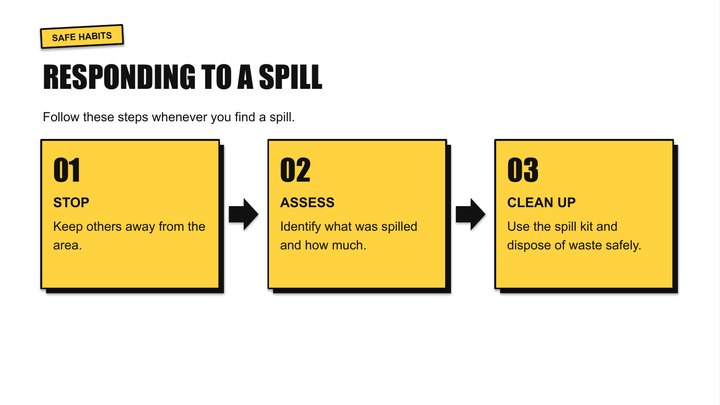
Every lesson, quiz and picture becomes a real, editable slide, designed in the look you pick. Three of them:
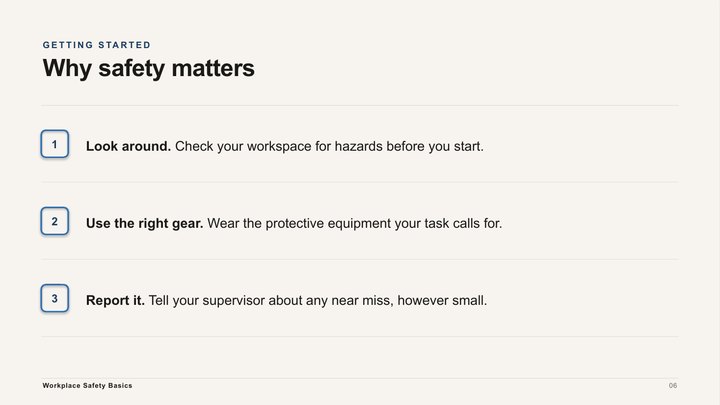
A numbered list slide in the Editorial look: warm cream with navy accents
Editorial · warm and calm
A steps slide in the Poster look: yellow cards and big type
Poster · loud and playful
A steps slide in the Bold look: dark, with giant numbers
Bold · dark, huge headlines

Your course stays with you

It’s converted right here in your browser. Nothing is uploaded, not to us, not to anyone.

Real slides, not pictures

Text, tables and charts stay editable in PowerPoint. Speaker notes keep what didn’t fit.

Minutes, not days

No rebuilding slides by hand. Drop the course, pick a look, download the deck.

Fix the pictures once, in every language Pro

Change the pictures on one deck. BuddySlides copies those changes into every other language, and each one keeps its own translated text.

Responding to a spill
English · the deck you edit
Ante un derrame
Spanish
Réagir à un déversement
French
こぼれたときの対応
Japanese

Try it: change the English slide, then apply it to the other languages. Moved, resized, cropped, swapped, added or deleted pictures all carry over.

Free to use. Pro when you need more.

Everything is free during the beta.

Free Always

The whole converter.

  • Every block, quiz, video and note
  • The Auto look, picked from your course
  • The course’s main language
  • A small credit line in the speaker notes

Pro Pay once

For people who make decks often.

  • Every look, plus your brand color
  • All of the course’s languages
  • Update every language from your edited deck
  • No credit line

No subscription. Beta testers get a founder’s discount at launch.

Unlock BuddySlides Pro

Paste the key from your BuddySlides Pro email. It unlocks every look, your brand color and all languages in this browser.